

As AI workflows and agents become more capable, the skills they rely on matter more than ever.
Most teams start building AI agent skills organically—a script here, a prompt there—and that’s a natural way to get going. But as the number of skills grows, so do the questions: How should you structure them? How do you keep token costs in check? How do you make sure a skill that works in one harness works in another?
In this article, we’ll walk through key best practices for skill development as identified by Red Hat’s Applied AI Engagement and Consulting (ACE) Team. We will cover techniques for designing, distributing, and evaluating AI agent skills. We draw on both existing research and hard-won lessons from building a production root-cause analysis (RCA) skill for the Red Hat Demo Platform (RHDP). While our examples are grounded in that specific project, the principles apply to any team building skills for AI agents, regardless of your harness, domain, or scale. These are our key findings in summary; keep reading for details and how-tos.
- Domain knowledge over performance: Skills that encode workflows and institutional knowledge deliver lasting value; skills that patch model gaps deprecate as models improve.
- Leverage determinism: Use scripts for mechanical tasks (fetching, formatting, validation) and LLM reasoning for subjective analysis. This cut costs 26% in our experiments.
- Evaluation is critical for improvements: A curated evaluation dataset is one of your most valuable assets. It grounds every optimization decision in evidence.
Design principles for scalable skills
A quick definition before we dive in: a skill is a self-contained unit of capability. It is a combination of instructions (typically in a SKILL.md file), scripts, and resources in a modular plugin that an AI agent can discover and execute to perform a specific task. Think of the AI agent as the worker and the harness as the runtime it operates in. The skills are the specialized tools the worker uses to get the job done.
Capability or preference? Know which type you’re building
Not all skills warrant the same investment, and understanding the distinction up front will save you time.
Capability skills compensate for things the base model can’t do consistently, such as tool calling patterns, format conversion, and domain-specific procedures. These tend to be ephemeral: as models and harnesses improve, they deprecate. For example, this logs-fetcher skill connects to a data server and retrieves logs based on filtering conditions. While current models rely on coded deterministic scripts for reliability, future iterations will likely handle this without a dedicated skill.
Preference skills encode workflows, conventions, and institutional knowledge, such as a team’s root-cause analysis process, a deployment checklist, or an incident playbook. These are durable, but only as valuable as their fidelity to the actual workflow. The model may be capable of executing each individual step, but it’s the skill that connects those steps into a reliable, repeatable process. Our RHDP RCA skill is an example: the value isn’t in any single step, but in the orchestrated workflow that captures how experienced engineers actually troubleshoot.
This maps to a well-known distinction in business analysis: tooling vs. process. You can swap one log collector for another, but the real value lies in the process knowledge: the hard-won understanding of what to check, in what order, and why. Subject matter experts consistently recommend defining the process first, then fitting tooling inside it.
Where to draw the boundary between scripts and LLM reasoning
This is perhaps the most impactful design decision you’ll make.
Scripts are cheap, transparent, and testable. They work well for data fetching, formatting, and validation. SKILL.md instructions are a better fit when the task is subjective, involves advanced reasoning, or has too many edge cases to enumerate. In practice, a hybrid approach best fits most production skills: scripts for the mechanical layer and SKILL.md for the reasoning layer.
The data backs this up. When we switched the RCA skill from an inference-driven method for fetching files to script-based GitHub API calls (see the RCA Context experiments), we saw a significant improvement in accuracy alongside a 26% cost reduction.
One big skill or many small ones?
When you’re encoding a complex business workflow, should you build one comprehensive skill or break it into several focused ones? The research on building AI skills points to a “less is more” approach.
The problem with going too broad: Comprehensive skills that attempt to address entire domains often degrade performance. Focused skills with clearly defined scopes consistently demonstrate higher reliability.
The problem with going too narrow: The optimal granularity is typically 1–3 skills per task. Beyond that threshold, you introduce cognitive overhead and conflicting instructions that diminish any gains. And there’s a deeper issue: more skills can actively hurt. Agents only load all relevant skills some of the time, and that drops when distractors are present. Worse, irrelevant skills don’t just sit idle; they can actively mislead the agent. A skill that only works when force-loaded is unlikely to work in production.
To help agents select the right skill in a crowded environment, consider:
- Namespacing skills by domain to reduce ambiguity
- Adding negative constraints to L1 descriptions (“do NOT use this skill for X”) to clarify boundaries
- Using a lightweight router skill to hand off tasks to the appropriate skill
Making progressive disclosure work for you
The three-level loading system manages how much context an agent takes on:
- L1 (metadata): A short description the agent uses to decide whether to load the skill at all
- L2 (instructions): The full SKILL.md with step-by-step guidance
- L3 (resources): Reference files, examples, and supplementary data loaded on demand
For best results, optimize each level according to its primary function. Here’s what we discovered mattered the most in practice.
- L1: L1 descriptions are your skill’s discoverability bottleneck. Agents use them to decide whether to load the full skill. Write your L1 descriptions like search-optimized abstracts. Be specific about what the skill does, what inputs it needs, and what outputs it produces. Generic summaries get overlooked.
- L2: L2 instructions should stay under 500 lines. SKILL.md performance degrades beyond this threshold. When you hit this limit, split optional content into separate files and load them on demand.
- L3: Ungated L3 resources are the biggest token sink. Reference files can inject tens of thousands of tokens per invocation if you’re not deliberate about what stays in L2 vs. what moves to L3. Gate everything that isn’t needed on every invocation.
When we refined the RCA skill, we migrated a specific fallback procedure from the core SKILL.md into a dedicated resource file. This ensured the auxiliary logic was retrieved only when needed, reducing token cost without sacrificing capability.
Getting skills into the hands of users
Installation methods
There are several ways to get skills into an environment:
- Direct placement: the skill folder is in the appropriate scope directory (e.g., in Claude Code,
.claude/skills/for project scope and~/.claude/skills/for user scope). The simplest approach for personal or project skills. - Plugin marketplace: Claude Code offers a
marketplace.jsonin.claude-plugin/that acts as a central registry, organizing skills into plugins (logical bundles of related skills). Install with/plugin marketplace addand/plugin install. Plugins can setstrict: trueto block loading if any skill fails validation, orstrict: falseto load skills independently. - npx / skills CLI: skills.sh provides a unified marketplace with one-command installation, telemetry-based popularity rankings, and category filtering.
- Git submodules: version-controlled access pinned to a specific commit, with update management. Useful when you want to track upstream skill repos without copying them.
We started with direct placement for development, then distributed via the plugin marketplace. One lesson we learned is the marketplace installs skills in a separate plugin directory, but environment variables need to live in the working directory that launches Claude Code. We solved this by using the working directory’s settings.json for configuration and adding a dedicated setup phase to improve the onboarding experience. The skills are also tracked in a wider skill marketplace as a submodule.
The portability problem: will your skill work everywhere?
The SKILL.md format is an open standard adopted by most platforms. In practice, however, harnesses differ in where they look for skills, how they discover them, and what extras they support (e.g., tool restrictions). Here’s a snapshot:
| Harness | Discovery path | Discovery model |
|---|---|---|
| Claude Code | .claude/skills/ | Automatic (description matching) and manual (/skill-name) |
| GitHub Copilot | .github/skills/, also reads .claude/skills/ | Automatic (three-level progressive disclosure) |
| Codex CLI | .agents/skills/ | Automatic (description matching, progressive disclosure) |
| Cursor | .cursorrules (project root) | Always-on — no selective discovery, rules apply to every interaction |
| Gemini CLI | .gemini/skills/ | Automatic |
| OpenCode | .opencodeai/skills/ | Automatic |
A skill written for one harness will often work in another, but full portability can require placing skills in multiple directories or using dual manifests (.github/ + .claude-plugin/). Directories like agentskills.io, skills.sh, and community collections (VoltAgent, Antigravity) index skills across harnesses and offer one-command installation.
The key takeaway for portability is to keep your underlying logic scripts separate from harness-specific prompts and configuration. Hardcode the sequential steps rather than relying on the agent to chain them. This makes your skill less dependent on any single harness’s orchestration behavior. The same skill can perform differently across runtimes depending on how each harness implements skill retrieval and injection. Decoupling logic from harness glue protects you from that variance.
Treating skills as software artifacts
Just like standard software dependencies, skills require versioning, governance, and security to ensure stability and trust across environments.
- Versioning: Script arguments, plugin source paths, and SKILL.md structures should not change in patch versions.
- Code review: Skill directories live in Git. Changes go through pull requests. Rollback capability matters. In production, the full evaluation suite runs before promoting a new version.
- Security hygiene: Manage credentials via environment variables, validate all inputs to prevent injection, require human confirmation for state-altering actions, and instruct models to ignore embedded commands from external data.
Evaluating your skills
Skill success can be measured across three dimensions: functional viability, directive compliance, operational efficiency.
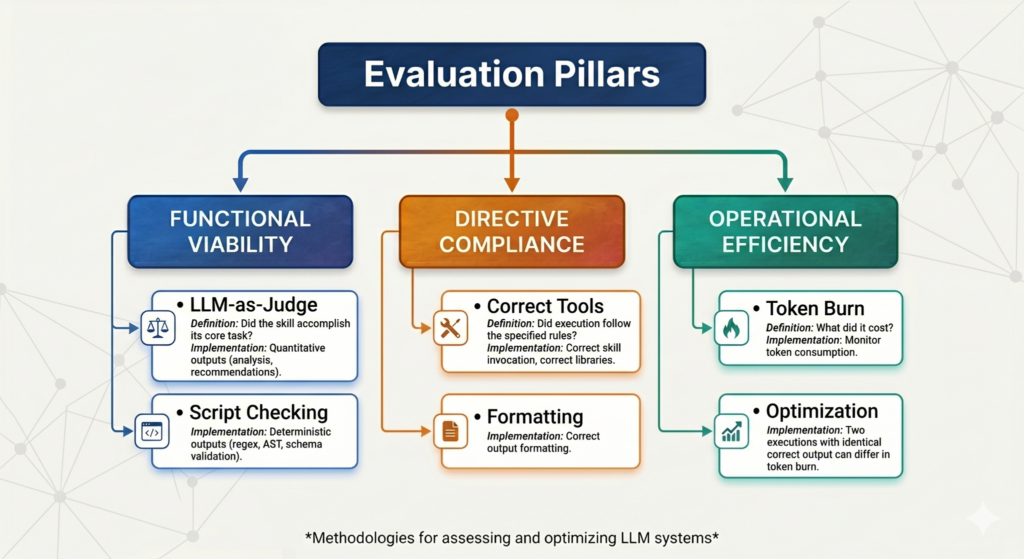
Building your evaluation dataset
A good test case has three components: a realistic, context-rich user prompt; a clear description of expected output; and any input files needed for execution. Start lean with 2-3 varied prompts covering casual language, precise language, and boundary conditions, then expand as you learn where the skill breaks. For example, our RCA evaluation dataset contains actual bugs, their root causes, critical findings, and red herrings. This allows us to test not only whether the skill finds the right answer, but whether it avoids the wrong ones.
Several tools can help you build and run evaluations:
- Skill creator is Anthropic’s built-in skill for creating and evaluating skills. It generates test cases, runs with-skill vs without-skill in parallel, grades via an LLM judge, aggregates benchmark statistics (mean/stddev for pass rate, tokens, time), and iterates based on feedback. It also has a description optimization loop that generates trigger/no-trigger queries, splits 60/40 train/test, and iteratively improves trigger accuracy.
- Feedback capture is another valuable approach. We built an open source Feedback Capture skill that collects freeform user commentary after primary skill use, generates summaries, categorizes feedback, and stores it for analysis. This surfaces real-world failure modes that synthetic test cases miss.
- Structured annotation takes feedback further. Our RCA Annotator skill walks users through a questionnaire to produce labeled ground truth data, adding a systematic layer to the evaluation process.
- Observability ties it all together. We connected our skill pipeline to MLflow, which gives us chat histories, execution timelines, and a step-by-step audit trail, from log retrieval through final summarization. This telemetry surfaces metrics like token cost, reasoning drift, and tool-calling precision.
Compressing skills without losing quality
Research on optimizing agent skills indicates that a lot of skill body content is non-actionable and compressing it can improve quality. To that end, the ACE team built SkillOpt, a tool that uses Genetic-Pareto (GEPA) evolutionary search to automatically compress SKILL.md files. It scores candidates with a hybrid evaluator that combines rule-based static analysis (filler density, conciseness, code-block preservation, structure) with an LLM judge that verifies that the compressed skill still handles realistic prompts. In one experiment, SkillOpt achieved a 90.4% reduction in skill volume while preserving response quality. If you’re hitting the 500-line threshold, automated compression is worth exploring before you resort to manual splitting.
Continuous integration for skills
To maintain stability, run your evaluation suite before any version upgrade:
- Automated regression testing: Configure CI to initialize the runtime and run evaluations before merging updates.
- Impact analysis: Compare across token expenditure, directive adherence, and functional correctness.
- Quality gates: Block merges based on regression limits, particularly to catch silent increases in token consumption.
Building effective AI agent skills isn’t fundamentally different from building good software. It just requires a few new mental models. Start by understanding the business process you’re trying to encode through a skill. Build a sample input and output file. Default to a hybrid architecture: scripts for the mechanical work, LLM reasoning for the subjective parts. Keep your skills focused, your SKILL.md files lean, and your L1 descriptions sharp.
Most importantly, borrow best practices from software engineering. Version your skills. Test them. Gate your merges. The teams that do this consistently will build skills that are reliable, portable, and cost-effective.
The skill ecosystem is still young, and best practices are evolving fast. As harnesses converge on the SKILL.md standard and agent routing improves, the bar for what constitutes a well-built skill will keep rising.
We’d love to hear what’s working for your team. What patterns have you found for designing reliable skills? What pitfalls have you hit that we didn’t cover? Share your experiences in the comments or contribute directly to the RHDP RCA Plugin. We’re building this knowledge base together.
Note: Red Hat’s Emerging Technologies blog includes posts that discuss technologies that are under active development in upstream open source communities and at Red Hat. We believe in sharing early and often the things we’re working on, but we want to note that unless otherwise stated the technologies and how-tos shared here aren’t part of supported products, nor promised to be in the future.


