
Triton is a domain-specific language and compiler for writing high-performance GPU kernels in Python. It offers fine-grained control over memory and parallelism, making it ideal for custom, architecture-optimized compute in machine language and high-performance computing workloads. However, Triton relies on just-in-time (JIT) compilation, which can introduce latency during the first execution of each GPU kernel, especially in production or multi-environment deployments.
To mitigate this, we’re introducing OCI image support for model kernel caches, through a new utility called Model Cache Vault (MCV). MCV packages compile kernel caches into OCI-compliant images that can be verified using Sigstore Cosign with cryptographic signatures. The combination of MCV and Cosign produces trusted, portable artifacts that can be shared across environments, reducing cold-start overhead and aligning with modern DevSecOps practices.
Note: Red Hat’s Emerging Technologies blog includes posts that discuss technologies that are under active development in upstream open source communities and at Red Hat. We believe in sharing early and often the things we’re working on, but we want to note that unless otherwise stated the technologies and how-tos shared here aren’t part of supported products, nor promised to be in the future.
This is the first installment in a three-week deep dive into Triton kernel trust and performance. In this post, we’ll cover the motivation, mechanics, and integration of this feature into your workflow.
Please note: MCV was previously known as TCV (Triton Cache Vault); its scope has since been expanded to include vLLM. You might still find references to TCV within this article. This article focuses on the vLLM use case that leverages Triton.
Why does Triton JIT need help?
Triton’s JIT model is essential for performance. It compiles kernels on-the-fly, tuned to the local hardware and workload. However, this compilation occurs at runtime and per process, leading to duplicate work when running the same kernels across different environments. While this isn’t a major issue during development, it becomes costly in production, especially when:
- Containers spin up repeatedly in autoscaling clusters
- CI jobs rebuild kernels unnecessarily
- Cold-start latency affects user-facing services
To address this, model caches can now be exported, shared, and reused via OCI images, transforming what was once a runtime-only optimization into a portable, infrastructure-level performance enhancement. Why take this approach instead of ahead-of-time (AOT) compilation? One reason is flexibility: even if a prebuilt image for the target hardware isn’t available, deployment can still proceed with a JIT compilation cost. In contrast, AOT would simply fail in that scenario.
Enter Model Cache Vault (MCV): Cache packaging
To make this possible, we’ve built MCV, a utility for packaging Triton’s JIT-compiled kernel or vLLM caches into OCI container images
These images can then be signed using Sigstore Cosign to drive greater trust and traceability. With MCV, cache management becomes just another part of your container workflow:
- Compile Model kernels to generate a local cache
- Package the cache into an OCI image using MCV (can also be integrated into CI pipelines)
- Sign it using Sigstore Cosign for provenance and integrity
- Push to a registry of your choice
- Verify Signature, pull and extract wherever the Kernel is needed
This enables cache reuse across machines, environments, and pipelines, reducing cold-start overhead and increasing reliability.
What’s in a Triton cache image?
A Triton cache image contains the compiled GPU kernels for one or more Triton programs, targeting specific architectures. By storing these as OCI images, we gain:
- Portability: Share across machines, users, or environments
- Efficiency: Skip compilation and run instantly
- Security: Sign and verify with Cosign
- Compatibility: Use with any OCI-compatible registry or tool (Docker, Podman, Kubernetes, etc.)
It’s just another container image, but it contains your precious, pre-tuned performance artifacts.
Enhancing cache security with Sigstore Cosign
Cache distribution introduces a new challenge: trust. If you’re loading precompiled GPU binaries, how do you know they’re safe? By using Sigstore Cosign to enable cryptographic signing of cache images with signatures, you can:
- Verify the origin of the image before loading it
- Detect tampering or unauthorized changes
- Enforce policy-based validation in your CI/CD or runtime environment
This aligns Triton cache distribution with modern DevSecOps and supply chain security best practices, making it safer to cache once and run anywhere.
How does MCV work?
Creating a Triton/vLLM Cache Image
Below is an example of using MCV to create an OCI Image from local source code:
$ ./_output/bin/linux_amd64/mcv -c -i quay.io/mtahhan/01-vector-add-cache -d example/01-vector-add-cache-rocm

INFO[2025-05-27 11:32:48] baremetalFlag false

INFO[2025-05-27 11:32:48] Using buildah to build the image

INFO[2025-05-27 11:32:49] Wrote manifest to /tmp/buildah-manifest-dir-2184368335/manifest.json

INFO[2025-05-27 11:32:49] Image built! 4a600c3c76c658fe1d6f960fbba648a294df3743c8711a1dd6acea7ea047d75f

INFO[2025-05-27 11:32:49] Temporary directories successfully deleted.

INFO[2025-05-27 11:32:49] OCI image created successfully.
Once the image is created, verify the image was created successfully. The output logs above shows buildah was used to build the image, so that should be used to list the images. buildah is preferred and will be used if detected, but docker and podman can also be used.
$ buildah images

REPOSITORY TAG IMAGE ID CREATED SIZE

quay.io/mtahhan/01-vector-add-cache latest beb4781fc7d1 About a minute ago 84.1 KB
Extracting a Triton Cache Image
Below is an example of trying to extract a CUDA kernel on a platform with only a ROCm GPU. MCV begins by collecting information about the system’s GPUs using tools like rocm-smi or amd-smi (and nvml for NVIDIA GPUs). Next, it attempts to pull the container image and compares the backend specified in the image labels with the GPU details it detected on the host system. In the example below, this check fails because the image backend is set to “cuda”, while the system has an AMD GPU.
$ ./_output/bin/linux_amd64/mcv -e -i quay.io/mtahhan/01-vector-add-cache:latest

INFO[2025-05-27 11:36:15] baremetalFlag false

INFO[2025-05-27 11:36:15] Adding the device to the registry [gpu][AMD]

INFO[2025-05-27 11:36:15] Using AMD to obtain GPU info

INFO[2025-05-27 11:36:15] Error registering rocm-smi: AMD already registered. Skipping ROCM

INFO[2025-05-27 11:36:15] Initializing the Accelerator of type gpu

INFO[2025-05-27 11:36:15] Starting up AMD

INFO[2025-05-27 11:36:16] Using AMD to obtain GPU info

INFO[2025-05-27 11:36:16] Startup gpu Accelerator successful

INFO[2025-05-27 11:36:16] Trying local fetcher: *fetcher.dockerFetcher

INFO[2025-05-27 11:36:16] Failed to fetch image locally using *fetcher.dockerFetcher:

INFO[2025-05-27 11:36:16] Retrieve remote Img quay.io/mtahhan/01-vector-add-cache:latest!!!!!!!!

INFO[2025-05-27 11:36:16] Img fetched successfully!!!!!!!!

INFO[2025-05-27 11:36:17] Compatible cache found: 6088b9b2e5149e06670bcec5bb3df8c56758f20ec349dd5f77f1507fe7cdf5fa

INFO[2025-05-27 11:36:17] Temporary directories successfully deleted.
Signing Container Images
Signing MCV container images can be easily done using Sigstore Cosign. Below is a summary of the steps needed to sign an image.
Step 1: Install Cosign
First, install the latest version of Cosign using the following command:
go install github.com/sigstore/cosign/v2/cmd/cosign@latest
Step 2: Sign the Image
To sign your container image, use the Cosign sign command. It is recommended to always use the image SHA rather than the latest tag. The latest tag can change over time, while the SHA uniquely identifies the specific image version, ensuring that you are signing the correct and immutable image. For example:
$ cosign sign -y quay.io/mtahhan/01-vector-add-cache@sha256:1fe2866013c0270d433c80e50c4aaa25920f9eb949e731816f1ca89279c21ca6                                                                                                               ⏎

Generating ephemeral keys...

Retrieving signed certificate...

The sigstore service, hosted by sigstore a Series of LF Projects, LLC, is provided pursuant to the Hosted Project Tools Terms of Use, available at https://lfprojects.org/policies/hosted-project-tools-terms-of-use/.

Note that if your submission includes personal data associated with this signed artifact, it will be part of an immutable record.

This may include the email address associated with the account with which you authenticate your contractual Agreement.

This information will be used for signing this artifact and will be stored in public transparency logs and cannot be removed later, and is subject to the Immutable Record notice at https://lfprojects.org/policies/hosted-project-tools-immutable-records/.

By typing 'y', you attest that (1) you are not submitting the personal data of any other person; and (2) you understand and agree to the statement and the Agreement terms at the URLs listed above.

Your browser will now be opened to:

...
During the signing process, Cosign will generate a URL and open it in your default browser. You will be prompted to authenticate using one of the supported providers:
- GitHub
- Microsoft
Once authenticated, Cosign will generate a verification code that you need to enter in the terminal to complete the signing process.
Step 3: Review the Signing Notice (or skip by passing the ‘-y’ flag on the commandline)
Cosign will display a legal notice explaining how your signing data will be stored:
- The signing service is hosted by Sigstore, part of the Linux Foundation (LF).
- Any data submitted, including your email address, will be stored in public transparency logs and cannot be removed.
- You must confirm that you are not submitting any personal data belonging to others.
To proceed, type y to agree to the terms
Step 4: Complete the Signing Process
After agreeing to the terms, Cosign will:
- Generate ephemeral keys.
- Retrieve a signed certificate.
- Create a transparency log (tlog) entry.
- Push the signature to your container registry.
Upon successful completion, you will see an output similar to:
Successfully verified SCT...

tlog entry created with index: 215011903

Pushing signature to: quay.io/mtahhan/01-vector-add-cache
Note: One can also inspect the image, as shown below.
$ skopeo inspect containers-storage:quay.io/mtahhan/01-vector-add-cache:latest

{
    "Name": "quay.io/mtahhan/01-vector-add-cache",
    "Digest": "sha256:785f3d7fb1cc38a1c817bb3d72e4fecde75a367093a1133db7549d5150584cfb",
    "RepoTags": [],
    "Created": "2025-05-27T11:32:49.368494851Z",
    "DockerVersion": "",
    "Labels": {
        "cache.triton.image/cache-size-bytes": "80415",
        "cache.triton.image/entry-count": "1",
        "cache.triton.image/summary": "{\"variant\":\"multi\",\"entry_count\":1,\"targets\":[{\"backend\":\"hip\",\"arch\":\"gfx90a\",\"warp_size\":64}]}",
        "cache.triton.image/variant": "multi"
    },
    "Architecture": "amd64",
    "Os": "linux",
    "Layers": [
        "sha256:370e94d944938ba1f0fbf509def1be948d8cc8665a56056dbc7ee94eacb287ca"
    ],
    "LayersData": [
        {
            "MIMEType": "application/vnd.oci.image.layer.v1.tar",
            "Digest": "sha256:370e94d944938ba1f0fbf509def1be948d8cc8665a56056dbc7ee94eacb287ca",
            "Size": 93184,
            "Annotations": null
        }
    ],
    "Env": null
}
Demo: Seeing Model Cache Vault in Action
To showcase the power of Model Cache Vault (MCV), we set up a simple yet representative demonstration.
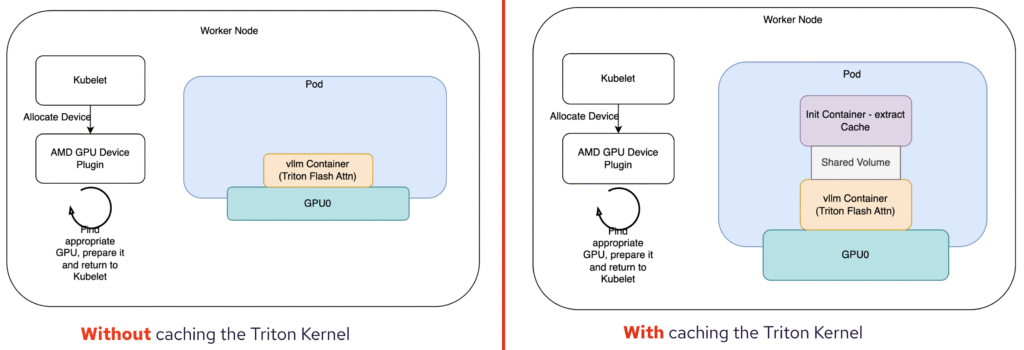
Our Playground: We used a single-node Kubernetes cluster equipped with two AMD ROCm GPUs, all set up using kubeadm. This gave us a realistic environment to mimic many modern deployments.
We chose to deploy the Llama-3.1 model, specifically Llama-3.1-8B-Instruct. We tracked the model’s startup time by pulling detailed timing stats directly from the logs.
The Baseline: To get a benchmark, we first ran the model without any precaching of the vLLM cache. This meant the model kernels were compiled from scratch. The result? A startup time of a rather hefty 112 seconds.
Our Secret Weapon: The Init Container: To leverage MCV, we introduced an init container. This container was responsible for extracting and reusing our pre-compiled vLLM cache. Think of it as giving the model a head start by providing it with ready-to-go components.
The Results are In: And the difference was dramatic! With the pre-loaded cache, our startup time plummeted to just over 62 seconds. That’s almost exactly a 2x speedup! Imagine the impact in a production environment where services need to scale quickly and respond instantly.
Watch the full demo here:
This demo clearly illustrates the significant benefits of using Model Cache Vault to manage and reuse model caches. Not only does it save time, but it also ensures a more consistent and predictable startup experience.
When should you use MCV?
You’ll benefit from MCV if you:
- Deploy Triton kernels or vLLM models at scale and care about startup latency
- Use containerized or cloud-native infrastructure
- Want to avoid redundant compilation in CI/CD or runtime environments
- Operate in security-sensitive or regulated environments
- Need reproducibility and trust in your GPU execution stack
Summary
OCI image support for Triton/vLLM kernel caches, powered by MCV and secured with Sigstore Cosign, brings together performance, portability, and trust. It turns Triton/vLLM’s runtime optimization into a reusable asset, speeding up cold starts and reducing compute waste.
You don’t need to choose between speed and supply chain integrity, now you can have both.
