

Why pay for proprietary text-to-speech (TTS) APIs when you can host your own TTS model on existing infrastructure? vLLM-Omni can serve a range of open weight TTS models that rival the realism and quality of any SaaS for a fraction of the price. With a greater freedom of choice of models and more control without any loss of features, the vLLM-Omni inference server is a compelling option for TTS use cases. Recognising the value of the platform Red Hat is investing in the upstream project and has built preview releases for customers. Read on for examples and a deep dive of the best TTS models vLLM currently supports.
vLLM-Omni for text-to-speech
vLLM-Omni natively supports more than 10 TTS models. The Red Hat vLLM-Omni team has selected a subset of these models to evaluate based on market interest and capability. We have conducted extensive testing on the mistralai/Voxtral-4B-TTS-2603, k2-fsa/OmniVoice and the Qwen3-TTS family, including the CustomVoice, VoiceDesign and Base variants.
TTS models are more compact than image and video generation models, which makes them more accessible to self hosting. The majority of TTS models can operate within 4GB to 16GB of VRAM. All of the validated models are capable of running on an NVIDIA L4 GPU. For reference, the Voxtral TTS model requires a GPU with 16GB of VRAM.
The main entrypoint for TTS models is /v1/audio/speech. The list of available voices is at /v1/audio/voices. Audio streaming is supported for a subset of models via the /v1/audio/speech/stream endpoint.
The majority of models ship with preset voices. However users can take advantage of the voice cloning capability to create a bespoke voice from an existing audio reference or through a detailed description, for example, “a young girl from Scotland with a high-pitched and excited voice.” Voice selection is only one means of styling the output. The instructions parameter can be used to provide additional delivery instructions, such as “speak sadly,” “whisper,” or “shout.” The speed parameter customizes the pace of the speaker. The preferred response language can also be explicitly stated.
Uses for TTS
One of the most popular uses of TTS is listening to an article or long document as if it were a podcast. Converting text to speech in this manner offers easier access to content, whether for education, information, or leisure. It offers convenience while multitasking, for example, reading text messages or emails aloud during a commute. TTS also simplifies content creation: Merely provide a script and within seconds the voiceover for a YouTube video or advertisement is ready. Industries from finance, sales, and manufacturing to public services and government bodies use TTS to streamline customer support and related customer services. TTS models may also be used in a chain to replicate a voice assistant.
Getting started with TTS on vLLM-Omni
After installing vLLM-Omni via the official guide, follow the examples below to experiment with the TTS models available.
First. serve the MistralAI Voxtral-4B-TTS-2603 TTS model:
vllm serve --omni mistralai/Voxtral-4B-TTS-2603 --port 8091
In another terminal, issue a basic curl request using one of the preset voices to create a joke. Compare against our result!
curl http://localhost:8091/v1/audio/speech -H "Content-Type:
application/json" -d '{"voice": "casual_male", "input": "What do you call a fake noodle? An <em>impasta</em>!"}' --output joke.wav
Try out the batching functionality, sending multiple phrases to convert to speech in one go:
curl http://localhost:8091/v1/audio/speech/batch \
  -H "Content-Type: application/json" \
  -d '{
    "voice": "casual_female",
    "items": [
      {"input": "Let'\''s play a game. Staring contest, right now. Don'\''t blink."},
      {"input": "I'\''ll count us down: Three... two... one... Go!"},
      {"input": "Still holding? Wow, you are good. I literally can'\''t blink, so this might take a while."}
    ]
  }' > response.json

# Step 2: Use jq to extract the audio data

jq -r '.results[0].audio_data' response.json | base64 -d > item1.wav
jq -r '.results[1].audio_data' response.json | base64 -d > item2.wav
jq -r '.results[2].audio_data' response.json | base64 -d > item3.wav
Generate phrases in different languages:
# List all available voices including voices designed for certain languages

curl http://localhost:8091/v1/audio/voices
Spanish
curl http://localhost:8091/v1/audio/speech -H "Content-Type: application/json" -d '{"input": "Hola amigos, bienvenidos al futuro de la voz digital", "voice": "es_female"}' --output futuro.wav
French
curl http://localhost:8091/v1/audio/speech -H "Content-Type: application/json" -d '{"input": "Au menu ce soir : de la bruschetta italienne, un croque-monsieur bien chaud, et pour le dessert, de délicieux churros espagnols. Bon appétit!", "voice": "fr_female"}' --output menu.wav
Why be limited to the built-in voices? Use the voice creation feature to upload a custom voice based on a sample audio file:
curl -X POST http://localhost:8091/v1/audio/voices \
    -F "audio_sample=@/path/to/voice_sample.wav" \
    -F "consent=user_consent_id" \
    -F "name=custom_voice_name" \
    -F "ref_text=The exact transcript of the audio sample." \
    -F "speaker_description=warm narrator"
To showcase audio streaming, swap to the Qwen/Qwen3-TTS-12Hz-1.7B-CustomVoice model:
# Step 1: Serve model capable of PCM streaming
vllm serve --omni Qwen/Qwen3-TTS-12Hz-1.7B-CustomVoice --port 8091

# Step 2: Call the stream endpoint
curl -X POST http://localhost:8091/v1/audio/speech \
    -H "Content-Type: application/json" \
    -d '{
        "input": "Hello, how are you?",
        "voice": "default",
        "stream": true,
        "stream_format": "audio",
        "response_format": "pcm"
    }' --no-buffer | play -t raw -r 24000 -e signed -b 16 -c 1 -
TTS model architectures
While all TTS models use the same API and can perform the same operations, the underlying architecture varies. In this section, we’ll compare the three Red Hat validated TTS models: Qwen TTS, Voxtral TTS and OmniVoice. All models generate audio at the recommended TTS output sample rate of 24 kHz.
Qwen
The Qwen TTS family itself offers three variants, each specialized in a particular area of speech. The CustomVoice variant is shipped with nine preset speakers ready to use. This is the most commonly used model from the collection. The VoiceDesign variant allows users to create custom voices from detailed descriptions, while the Base variant is primarily used for voice cloning where a reference audio recording is supplied.
Qwen TTS is one of few models that support audio streaming via the v1/audio/speech/stream endpoint. Text input is incrementally accepted and delivered as one continuous request.
All of the models in the Qwen TTS family follow the same architecture with two stages: the talker stage and a code2wav stage, as seen in the diagram below. Both stages can be cohosted on a single GPU. The code2wav stage is the key stage that converts RVQ codec codes produced by the talker to an audio waveform.
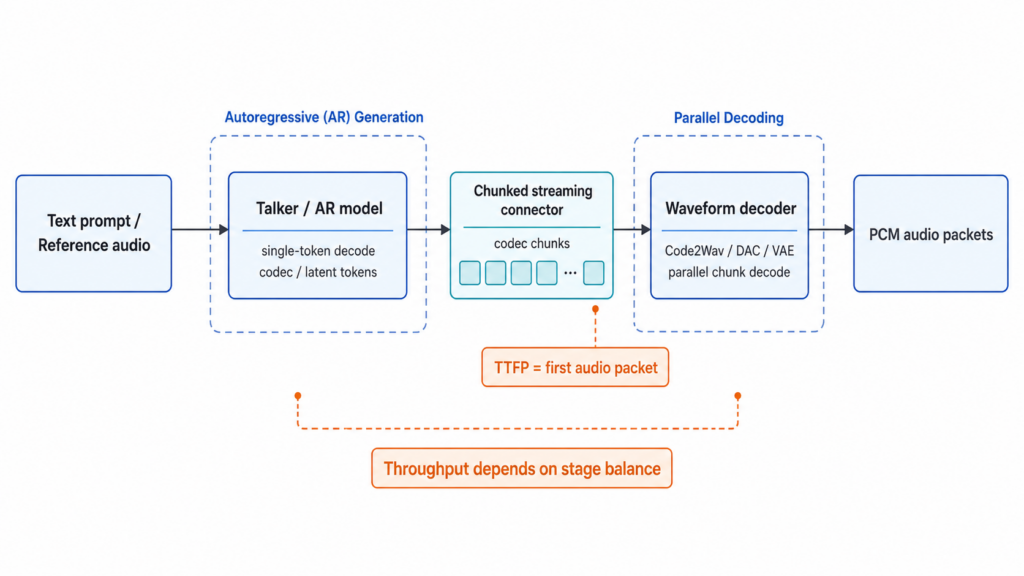
The model stages are defined in the deploy config and automatically created on start up. These can be overridden or completely replaced on server initiation. For example, there is a high concurrency profile for QwenTTS an admin might decide to deploy:
vllm serve --omni Qwen/Qwen3-TTS-12Hz-1.7B-CustomVoice \
--deploy-config vllm_omni/deploy/qwen3_tts_high_concurrency.yaml
Voxtral TTS
Similar to the Qwen TTS family, Voxtral TTS is an autoregressive model with two stages. The first stage is a streaming audio generator that produces the audio tokens. These are forwarded to a specialized audio tokenizer designed by Mistral, the creators of the model. The open model hosted on Hugging Face can be served via vLLM-Omni; however, it does not support voice cloning. That said, the model is shipped with 20 voices, and each can be customized with instructions.
OmniVoice
OmniVoice is, as of the time of writing, the only pure TTS diffusion model supported in vLLM-Omni. Hence it follows a completely different execution path to every other autoregressive TTS model. It is composed of two stages served on a single GPU. Stage one is a generator that performs iterative unmasking to produce codebook audio tokens. The audio tokens are forwarded to the second stage, the decoder stage, to be converted into a waveform.
OmniVoice is not only unique in its architecture; it is noticeably lacking in preset voices. Each time a request is sent, a voice is generated on the fly. Users may specify instructions to control the style of voice created or provide a reference audio for voice cloning and more fine-grained control of the speaker.
Of the models discussed, OmniVoice is the sole model to include a dedicated ASR (Automatic Speech Recognition) model. The ASR is required to analyze any reference audio supplied. The ASR is specified in the model’s deploy config under the additional config field.
Special TTS features
Speaker cache
All models support voice cloning, also referred to as voice upload, and register the new voice with the /v1/audio/voices endpoint, up to a maximum of 1,000 speakers. Under the hood, these speaker embeddings are stored as safetensors in ~/.cache/vllm-omni/speakers. On server start up these embeddings are loaded in. This essentially means that all uploaded voices are accessible to all TTS models and can be used as long as the model accepts custom voices. This is valuable from an enterprise point of view, as it supports voice continuity should the TTS model need to be swapped out. For example, the same uploaded voice is interoperable between the OmniVoice and Qwen/Qwen3-TTS-12Hz-1.7B-Base models.
Word timestamps
Word timestamps are a new feature still in development and not yet supported for all TTS models. It was designed with voice agent use cases in mind. The intention of word-level timestamps is to highlight at what point the user interrupted the voice agent and provide data for performance analysis. Word timestamps are only compatible with the /v1/audio/speech/stream endpoint. Word timestamps are implemented via a forced aligner model; Qwen/Qwen3-ForcedAligner-0.6B is recommended. The server must be initiated with the forced aligner to gain the benefit of word timestamps. See the start up command below:
vllm-omni serve Qwen/Qwen3-TTS-12Hz-1.7B-CustomVoice \
    --omni \
    --deploy-config vllm_omni/deploy/qwen3_tts.yaml \
    --trust-remote-code \
    --forced-aligner Qwen/Qwen3-ForcedAligner-0.6B
Try vLLM-Omni
vLLM-Omni is a powerful inference server capable of hosting the best-in-class TTS models, with support continually added for new models once available. The server is fully compatible with the OpenAI spec and ready to integrate with your applications. Many enterprises consider voice agents and other creative uses of TTS applications to be the gateway into multimodal artificial intelligence. To support enterprises deploying their TTS and other multimodal applications, Red Hat is actively contributing to the upstream project and has already created a dev and tech preview for customers. Upgrade to Red Hat OpenShift AI 3.6 EA1 to try it for yourself.
