

Successfully getting an AI model up and running in a closed lab environment is one thing. Trying to get that same model to run reliably on remote edge devices is a whole other problem entirely.
Any MLOps workflow follows the same cycle: develop a model, package it, deploy it to where inference happens, collect telemetry on how it performs, and feed that back into retraining. Each stage has its own challenges, but the edge amplifies all of them. Devices are remote, often GPU powered but resource constrained, running immutable operating systems, and managed at fleet scale rather than individually. Getting GPU drivers working on an immutable OS, shipping model updates without downtime, and closing the feedback loop from device metrics back to retraining are the problems that make edge MLOps distinct from cloud MLOps.
We built a reference architecture that tackles this end-to-end using Red Hat tooling: RHEL 10 bootc images (container-native OS images that are built, shipped, and updated as OCI containers) for the immutable edge OS, FlightCtl for fleet management, Red Hat OpenShift AI (RHOAI) and Kubeflow Pipelines (KFP) for the retraining loop, and GitHub Actions with OpenShift BuildConfigs for CI/CD. This blog walks through what we built, what broke along the way, and what we learned. It’s designed for those of you thinking about deploying AI workloads outside of a Kubernetes cluster and should give you a starting point for this work.
The architecture
The system is built around two loops:
Outer loop (build and deploy): A git push or Tekton pipeline trigger kicks off a series of GitHub Actions, which use the OpenShift BuildConfig resource to rebuild container images. The images are pushed to Quay.io, quadlet files (systemd-native definitions for running containers) are updated with the new tags and packaged as an OCI artifact (a standardized container image format used here to ship configuration), and the FlightCtl fleet spec is updated. FlightCtl rolls the change out to all enrolled edge devices. Every artifact is tagged with the commit SHA for traceability.
Inner loop (model refresh): A Kubeflow pipeline on OpenShift AI retraining generates a version tag and fires a GitHub API workflow dispatch handing off to the outer loop for the actual build and deployment. The idea is that edge metrics collected from OpenTelemetry (inference latency, error rates) can trigger this automatically, closing the loop from device back to model.
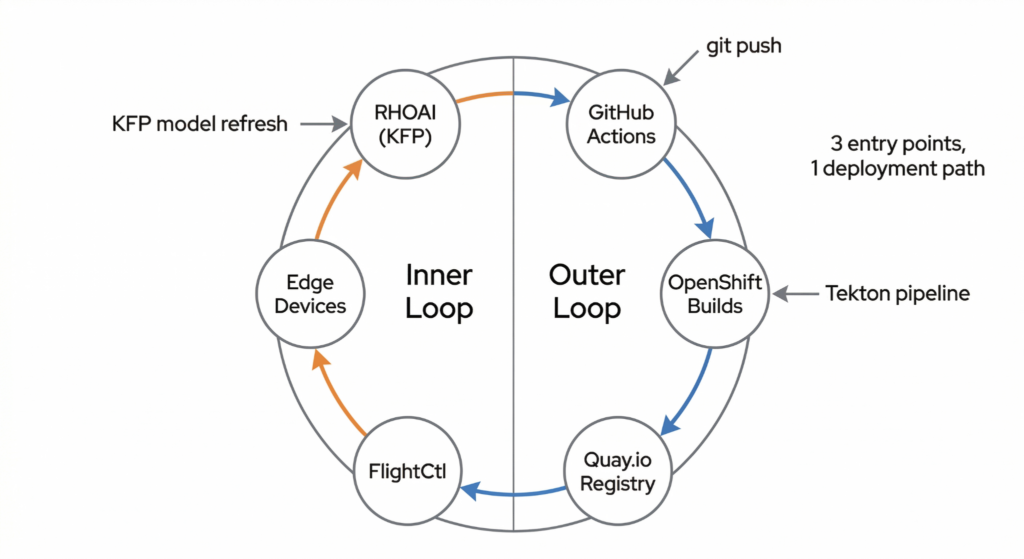
There are three entry points into this pipeline—a git push, a KFP model refresh, or a Tekton pipeline—but they all converge on the same deployment path.
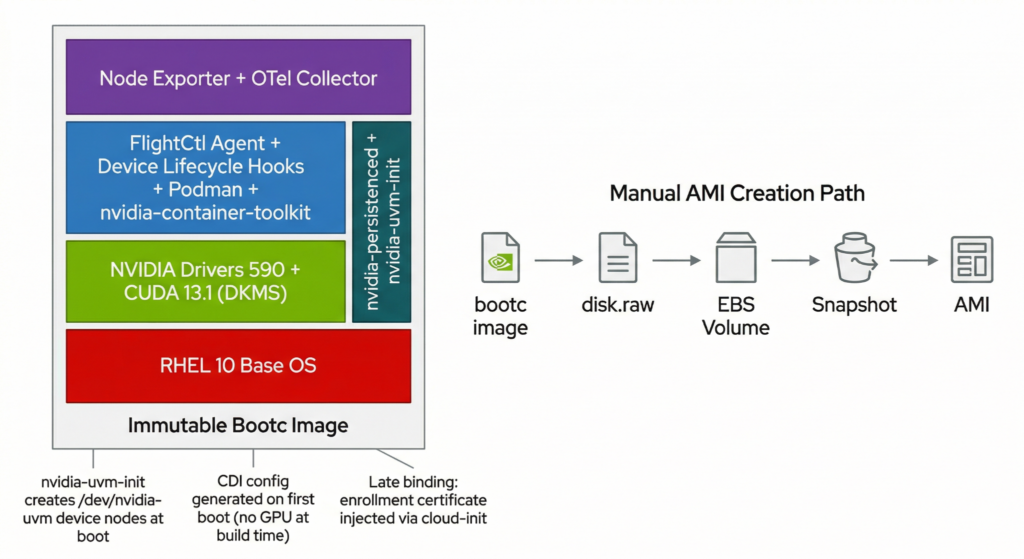
The edge devices run a custom RHEL 10 bootc image with pre-compiled NVIDIA drivers, the FlightCtl agent, and an OpenTelemetry collector—all immutable and reproducible from a single Containerfile.
Building the immutable edge OS image
Each edge device enrolled runs RHEL 10 as an immutable bootc image. Everything the device needs is baked in at build time, including GPU drivers, container runtime, FlightCtl agent, and observability tooling. One of the hardest things was getting the required NVIDIAsetup working on an immutable OS. DKMS normally compiles kernel modules at boot, but bootc images are immutable: there are no writable /usr/lib/modules at runtime. Our workaround was:
- Pinning Nvidia drivers to 590.x and compiling kernel modules at image build time with
dkms autoinstall - Masking
dkms.serviceso it never tries to rebuild at runtime - Adding a custom
nvidia-uvm-init.serviceto create/dev/nvidia-uvmdevice nodes at boot, asnvidia-persistencedalone doesn’t handle UVM devices - Generating the CDI (Container Device Interface) spec on first boot via a oneshot service, since there’s no GPU present during the image build
It works reliably now, but getting here took considerable effort. We started with RHEL 9.7, but this had kernel incompatibilities with the NVIDIA 590 drivers that we couldn’t work around. So we switched to RHEL 10, which resolved the issue, but there were still a lot of standard packages missing that had to be imported from CentOS Stream 10. The DKMS approach also pulled in a long chain of build dependencies: gcc, make, kernel-devel, kernel-headers, and X11/OpenGL/Vulkan libraries that NVIDIA’s driver packages require, even for headless compute.
Then, we hit another roadblock: the RHEL 10 openssl-fips-provider conflicted with our required CentOS Stream packages. The fix was to use the dnf swap command to replace the OpenSSL packages atomically, allowing the installation to proceed. The resulting Containerfile section was roughly 80 lines of workarounds.
On a standard RHEL 10.1 system with a GPU present, the recommended approach is Red Hat’s rhel-drivers tool—a single command that auto-detects the accelerator hardware, enables the RHEL Extensions and Supplementary repositories, and installs pre-compiled NVIDIA open kernel modules built and signed by Red Hat:
sudo dnf install rhel-drivers
sudo rhel-drivers install nvidia
No DKMS, no build toolchain, no CentOS Stream imports. For bootc image builds, however, rhel-drivers can’t be used, as it requires hardware auto-detection, and there’s no GPU present during a container build. We tested this, and it fails with “No compatible hardware found!” Instead, we install the same nvidia-open package directly from the RHEL Extensions repo. RHSM credentials are passed as Podman build secrets so they don’t end up in the final image:
RUN --mount=type=secret,id=rhsm_user --mount=type=secret,id=rhsm_pass \
    subscription-manager register \
      --username="$(cat /run/secrets/rhsm_user)" \
      --password="$(cat /run/secrets/rhsm_pass)" && \
    dnf -y \
      --enablerepo=rhel-10-for-x86_64-extensions-rpms \
      --enablerepo=rhel-10-for-x86_64-supplementary-rpms \
      install nvidia-open nvidia-container-toolkit && \
    dnf -y clean all && \
    subscription-manager unregister
These are the same Red Hat-built and signed packages that rhel-drivers installs under the hood. The remaining boot-time setup (loading nvidia/nvidia-uvm kernel modules, nvidia-persistenced, the custom UVM init service, and first-boot CDI generation) stays the same regardless of how the drivers were installed.
For containers that need GPU access, NVIDIA advises disabling SELinux through --security-opt=label=disable. For security reasons we opted against this and searched for an alternative. Instead, we set the container_use_devices SELinux boolean at image build time, which lets containers access GPU devices through CDI while keeping SELinux enforcing.
The FlightCtl agent is installed and enabled, but there’s no enrollment certificate in the image. The cert is injected at boot time via cloud-init, so the same AMI works across different FlightCtl instances.
The application stack
The inference application is three containers, defined as systemd quadlet files:
The modelcar is a minimal UBI Micro image containing the Llama 3.2 1B model files. It runs as a Type=oneshot service that copies the model into a shared Podman volume and exits. This decouples the model artifact from the inference server so they can be versioned independently.
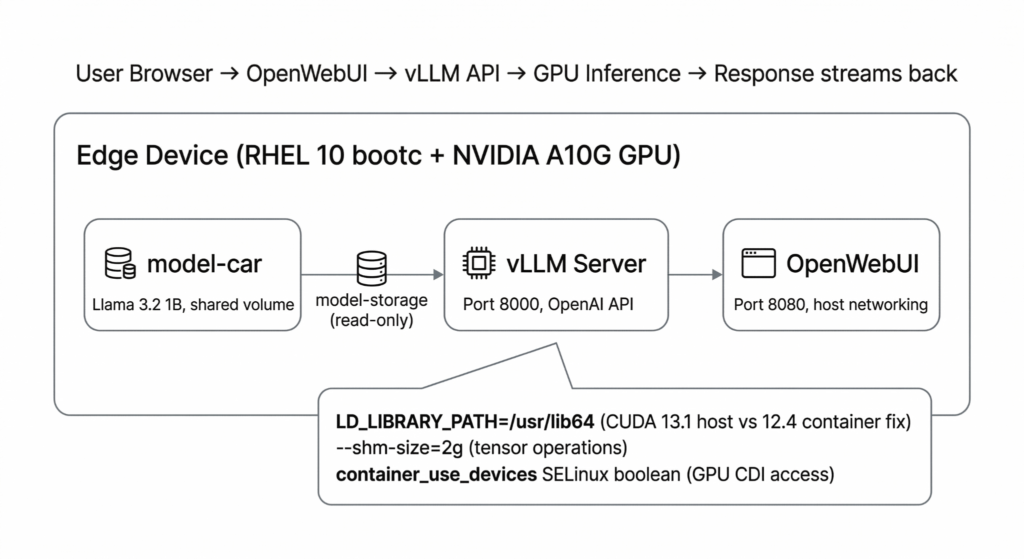
The vLLM inference server serves the model on port 8000 with an OpenAI-compatible API. The quadlet config handles GPU passthrough via CDI (AddDevice=nvidia.com/gpu=all) and sets 2GB shared memory for tensor operations. We encountered a subtle version mismatch. Our bootc image provided CUDA 13.1, but the vLLM container came bundled with an older version (12.4). At startup, vLLM checks its own bundled CUDA version, sees 12.4, and refuses to start with a misleading “CUDA driver version insufficient” error—even though the host driver is newer. Setting LD_LIBRARY_PATH=/usr/lib64 forces vLLM to use the host’s CUDA libraries instead of its bundled ones, resolving the mismatch.
OpenWebUI provides a chat frontend on port 8080 using host networking, pointed at the vLLM API on localhost.
The quadlet files (.container, .volume, .network, .timer) are packaged into a scratch OCI image and pushed to Quay.io. When FlightCtl deploys the application, the agent extracts these files to /etc/containers/systemd/, and Podman’s quadlet generator converts them into systemd units with proper dependency ordering. From systemd’s perspective, these are just services that start on boot, respect dependencies, and restart on failure.
Observability: metrics from the edge
In AI and especially in MLOps, a comprehensive observability stack is vital. MLOps as a workflow is heavily reliant on observability and metrics to automatically trigger the next phase in the process.
To gather the necessary metrics from the edge devices, we enabled the Otel Collector in the base image. The base image contains a generic collector configuration to retrieve data on CPU and memory usage. Using the Red Hat distribution of the Otel Collector, drop-in directories for further configuration are available, which can then be leveraged to define application specific metrics. In the FlightCtl fleet spec, users can specify these metrics as part of their application configuration. The example below shows where the user points to a FlightCtl Git Config provider, which in turn points to a config file that contains the vLLM metrics endpoint to be scraped. This analyzes the performance of both the inference server and the model.
Sample fleet spec
apiVersion: flightctl.io/v1beta1
kind: Fleet
metadata:
  name: mlops
spec:
  selector:
    matchLabels:
      project: mlops
  template:
    metadata:
      labels:
        fleet: mlops
    spec:
      applications:
        - name: mlops-gpu-stack
          appType: quadlet
          image: quay.io/redhat-et/mlops-quadlet:425da63
      config:
        - name: inference-server-metrics
          gitRef:
            repository: mlops-at-the-edge
            targetRevision: main
            path: scenarios/scenario-01-device-edge/flightctl/configs
Otel Collector drop-in config
receivers:
  prometheus:
    config:
      scrape_configs:
        - job_name: 'vllm-metrics'
          scrape_interval: 10s
          static_configs:
            - targets: ['localhost:8000']
service:
  pipelines:
    metrics:
      receivers: [prometheus]
With each edge device collating information, we need a centralized location to store and analyze the data. Fortunately, FlightCtl ships with a component called the Telemetry Gateway, which can be configured to receive metrics from various sources. Each edge device is configured to export metrics to the FlightCtl Telemetry Gateway. To visualize the data we use Grafana dashboards.
The observability stack can be extended to monitor the value of specific model performance metrics to gauge where or not the model is under performing and in need of retraining. Once these metrics fall below a given threshold, the inner loop of the MLOps cycle is triggered.
The CI/CD pipeline: From alert to deployment
The outer loop triggers the deployment phase. The outer loop has three entry points via a git push, a KFP model refresh dispatch, or a Tekton pipeline. They all, however, converge on the same path:
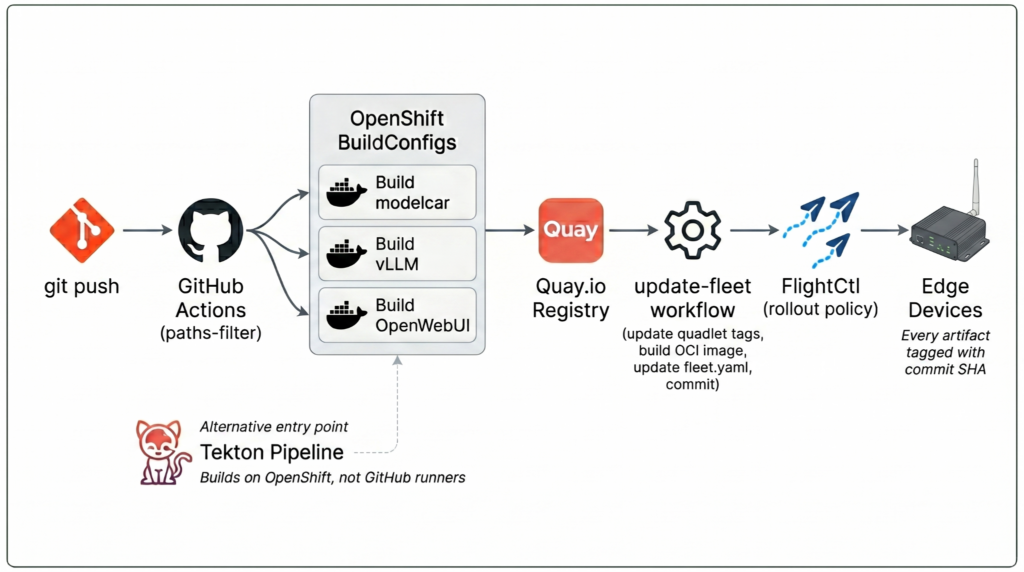
- GitHub Actions receives the trigger and uses the
dorny/paths-filteraction to detect which containers changed. - It logs into the OpenShift cluster and triggers BuildConfigs that rebuild the affected container images in parallel on OpenShift, not on GitHub runners.
- Images are pushed to Quay.io tagged with the commit SHA.
- A reusable
update-fleetworkflow updates the quadlet files with the new image tags, builds a new quadlet OCI artifact, and pushes it to Quay. - The fleet.yaml is updated with the new quadlet image tag and committed back to main.
- The updated fleet spec is applied to FlightCtl via the CLI, triggering a rollout to all enrolled devices.
The inner loop is a four-step KFP v2 pipeline on Red Hat OpenShift AI:
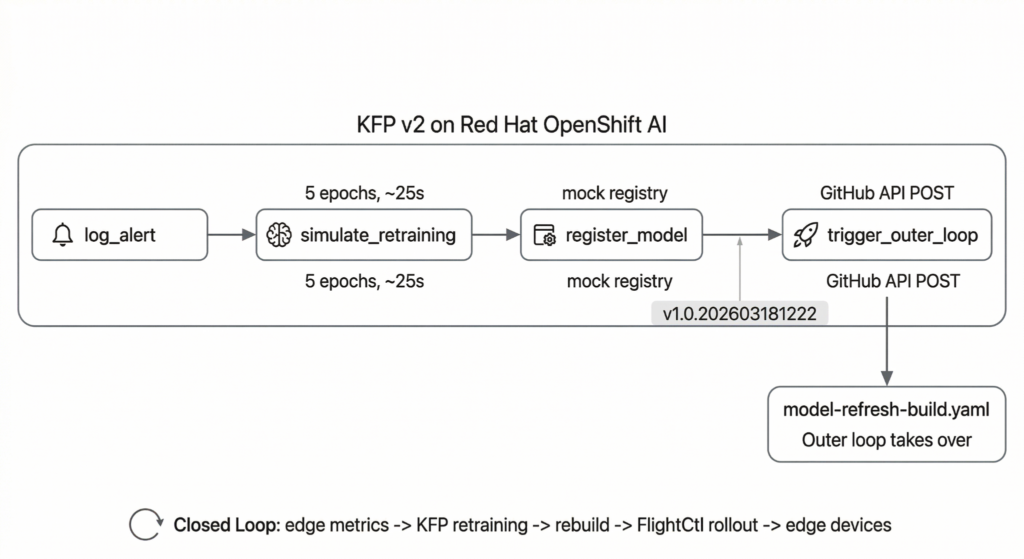
- Log alert: Captures the triggering context (alert name, severity, device ID)
- Simulate retraining: Runs a mock training loop and generates a timestamp-based version tag
- Register model: Mock registration (logs the model version and Quay artifact URI)
- Trigger outer loop: POSTs a workflow dispatch to GitHub Actions, passing the new model version tag. Then the outer loop completes the cycle.
The pipeline can be triggered from the RHOAI dashboard or via a CLI script. Eventually, edge metrics could trigger this automatically, completing the closed loop from device back to model.
Lessons learned
How do you install NVIDIA drivers on an immutable RHEL image?
Enabling NVIDIA drivers within an immutable OS is solvable, but a user must allow time to configure it. We initially went down the DKMS path: build-time compilation, masked services, CentOS Stream dependency imports, and OpenSSL FIPS workarounds. It worked, but the Containerfile was fragile and hard to maintain. On a running RHEL 10.1 system, rhel-drivers install nvidia is the simplest path. It can’t be used for bootc image builds (it requires hardware auto-detection, and there’s no GPU during a container build), but the same pre-compiled nvidia-open package can be installed directly from the RHEL Extensions repo. Either way, skip DKMS entirely.
How do you keep SELinux enforcing with GPU workloads?
Don’t disable SELinux for GPU workloads; instead use the container_use_devices. It keeps SELinux enforcing while allowing containers to access GPU devices through CDI. We didn’t know about this initially and wasted time using the --security-opt=label=disable flag before finding the proper solution.
Why use quadlets instead of Podman Compose for FlightCtl?
Quadlets are a natural fit for FlightCtl. Systemd-native container definitions with dependency ordering, health checks, and restart policies packaged as OCI artifacts for GitOps delivery. They allow more control than Podman Compose.
Does FlightCtl automatically apply fleet spec changes from git?
Close the CI loop explicitly. FlightCtl watches git for config changes, but the fleet spec still needs to be applied via the API. We added a flightctl apply command to the GitHub Actions pipeline to close this gap.
What happens to an empty ENTRYPOINT when built with Buildah?
Watch out for Buildah’s ENTRYPOINT handling. An empty ENTRYPOINT [] in a Dockerfile gets serialized as /bin/sh -c null when built via OpenShift BuildConfigs, which silently breaks containers at runtime.
What’s next
This is a reference architecture, not a production deployment. The retraining is simulated and the model registry is mocked. The natural next steps are real model retraining with GPU-accelerated training pipelines, alert-driven automation where inference latency metrics trigger the inner loop without human intervention. We’re also looking at integrating with Red Hat’s model registry for proper model lifecycle management.
The full source code and sample dashboards are available at github.com/redhat-et/mlops-at-the-edge.
Note: Red Hat’s Emerging Technologies blog includes posts that discuss technologies that are under active development in upstream open source communities and at Red Hat. We believe in sharing early and often the things we’re working on, but we want to note that unless otherwise stated the technologies and how-tos shared here aren’t part of supported products, nor promised to be in the future.

